Ordinary developers use "AI coding assistant" and "deployment pipeline" as two separate tools glued together by copy-pasting code my dear lovely gadha log. Connect GitHub to Claude after reading my blog and that gap disappears. Claude reads your actual repository, opens real branches, ships real pull requests, and (if you let it) watches those pull requests through CI and merge. We rebuilt our own CMS auto-save pipeline this way in a single session, so this is less theory and more a field-tested checklist.
WHat is "connecting GitHub with Claude"
There are two very different levels of integration, and mixing them up is where most people get stuck:
- Claude reads your repo. You point Claude at a GitHub repository, it can browse files, understand your codebase, and suggest changes. This is the baseline.
- Claude acts on your repo. Claude can create branches, commit, open pull requests, merge them, and respond to CI failures or review comments, without you copy-pasting a single diff. This is what actually automates development.
The setup below gets you to the second level.
Step: Give Claude access to GitHub
If you're using Claude Code (the CLI/agent product, available at claude.com/claude-code or inside claude.ai), GitHub access comes through a connected GitHub App or OAuth authorization tied to your account:
- Authorize the GitHub connector from your Claude account settings.
- Scope it to specific repositories rather than your entire GitHub account, least permissions hi rakho as Claude can push code.
- Decide read vs. push access per repo. Read-only is fine for a codebase you just want explained or audited; push access is what you need for the automation in the rest of this guide.
Running Claude Code locally instead? The same idea applies through your machine's own git credentials. Claude shells out to the git and gh tooling already configured on your system, so a working gh auth login is the local equivalent of the connector authorization above.
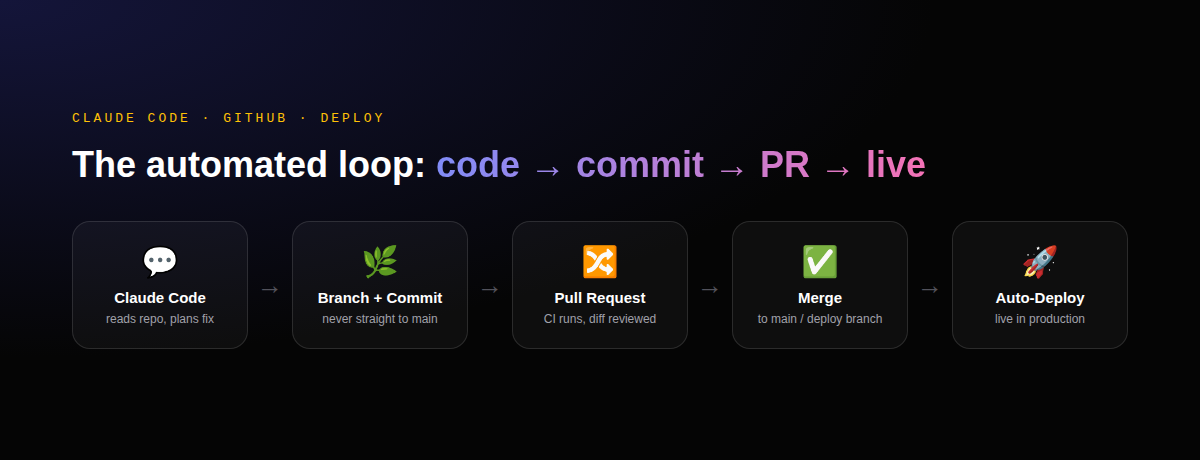
Step 2: Let Claude branch and commit properly
Once access is granted, the workflow that actually scales is:
- Claude creates a dedicated feature branch for the task — never commits straight to
main. - Changes are committed with clear, scoped messages explaining why, not just what changed.
- The branch is pushed to origin.
This is exactly how a careful human contributor works, which is the point, you want an audit trail you can review, not a black box that silently rewrites your production branch.
Step 3: Pull requests and merge them
Every change becomes a pull request instead of a direct commit to your deploy branch. This buys you three things automatically:
- A diff you can actually read before it touches production.
- CI running on the branch build, lint, tests, before merge.
- A rollback point. If something's wrong, you revert one PR instead of untangling a direct commit from everything after it.
Only ask Claude to merge automatically once you trust the pattern for a given repo, bhai ye bhi gadbad karta hai. For anything touching production data or user-facing behaviour, review the diff yourself first Claude will tell you what changed and why, but the final call on a live site is yours.
Step 4: Automate the deployment side
Getting code into main is half the job. The other half is getting main onto your actual server, and this is where most "automated" setups quietly break:
- Git-connected auto-deploy (common on managed hosts like Hostinger, Vercel, Railway): a push to your deploy branch triggers a fresh build and restart automatically. Simple, but know whether it's a persistent, incrementally-updated checkout or a fresh build every time, that single detail changes what's safe to assume survives a deploy.
- Webhook-triggered pipelines: GitHub fires a webhook on push, a CI/CD service builds and deploys. More control, more moving parts to maintain.
Either way, treat every deploy as disposable. Anything your app needs that isn't in the git repo — uploaded files, live-edited config, database rows, will not survive a redeploy unless you've deliberately made it survive one.
Step 5: WWhy changes not reflecting even after automating git
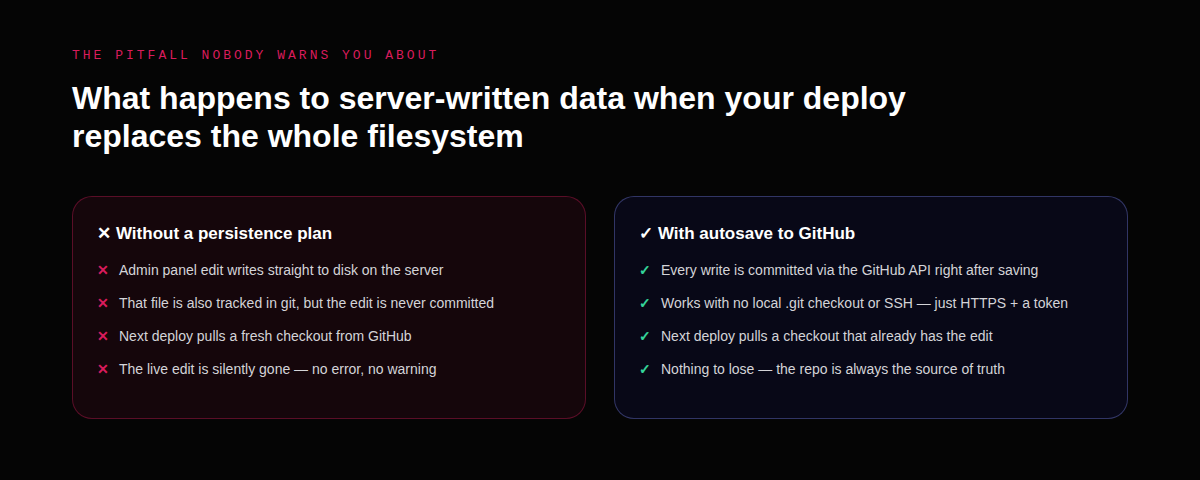
This is the part we learned the hard way, and it's worth stating plainly: if your app writes data to disk on the server (uploaded images, a CMS saving JSON, config edited through an admin panel), and your deploy process replaces that disk with a fresh copy of the repo, those edits vanish on the next deploy, even if the deploy had nothing to do with that data.
Two fixes, in order of how much infrastructure they need:
- Move mutable data out of the deploy path entirely, a real database, or a storage bucket, that no deploy ever touches. The correct long-term answer.
- Commit every write back to git in real time, via the GitHub REST API rather than shelling out to a local
gitbinary — useful when your hosting doesn't even keep a.gitfolder in the running app (increasingly common on managed Node hosts that build fresh per deploy). It works over plain HTTPS with a scoped access token, no server-side git installation required.
Whichever you pick, get the path right the first time — writing to the wrong location in the repo is a silent failure: everything looks like it saved, right up until the next deploy quietly reverts it.
A working checklist
- Connect GitHub scoped to specific repos, not blanket account access.
- Every change lands as a branch + pull request, never a direct push to your deploy branch.
- CI runs on the PR before anything merges.
- Know exactly what your deploy process does to the server's existing filesystem, persistent pull, or fresh build every time.
- Anything written at runtime that must survive a deploy gets its own explicit persistence plan, database, bucket, or an API-based autosave, never "it's just a file on disk."
Where this gets you
Done right, this isn't just "AI writes code faster." It's a development loop where fixing a bug, shipping a feature, and deploying it to production all happen inside one conversation, with a real audit trail (commits, PRs, deploy logs) at every step, instead of a chat window full of code you have to manually wire up yourself.
If you'd rather someone set this up for you
Everything above is exactly how we run development on our own site — the CMS, the auto-save pipeline, the tracking, all of it. If you're evaluating whether an AI-driven workflow like this is worth setting up for your own product or website, and want someone to actually wire up the GitHub connection, the deploy pipeline and the guardrails around it, instead of piecing it together from blog posts, that's the kind of build we do at DigiBrandBox. Happy to walk you through what we'd set up for your stack specifically.