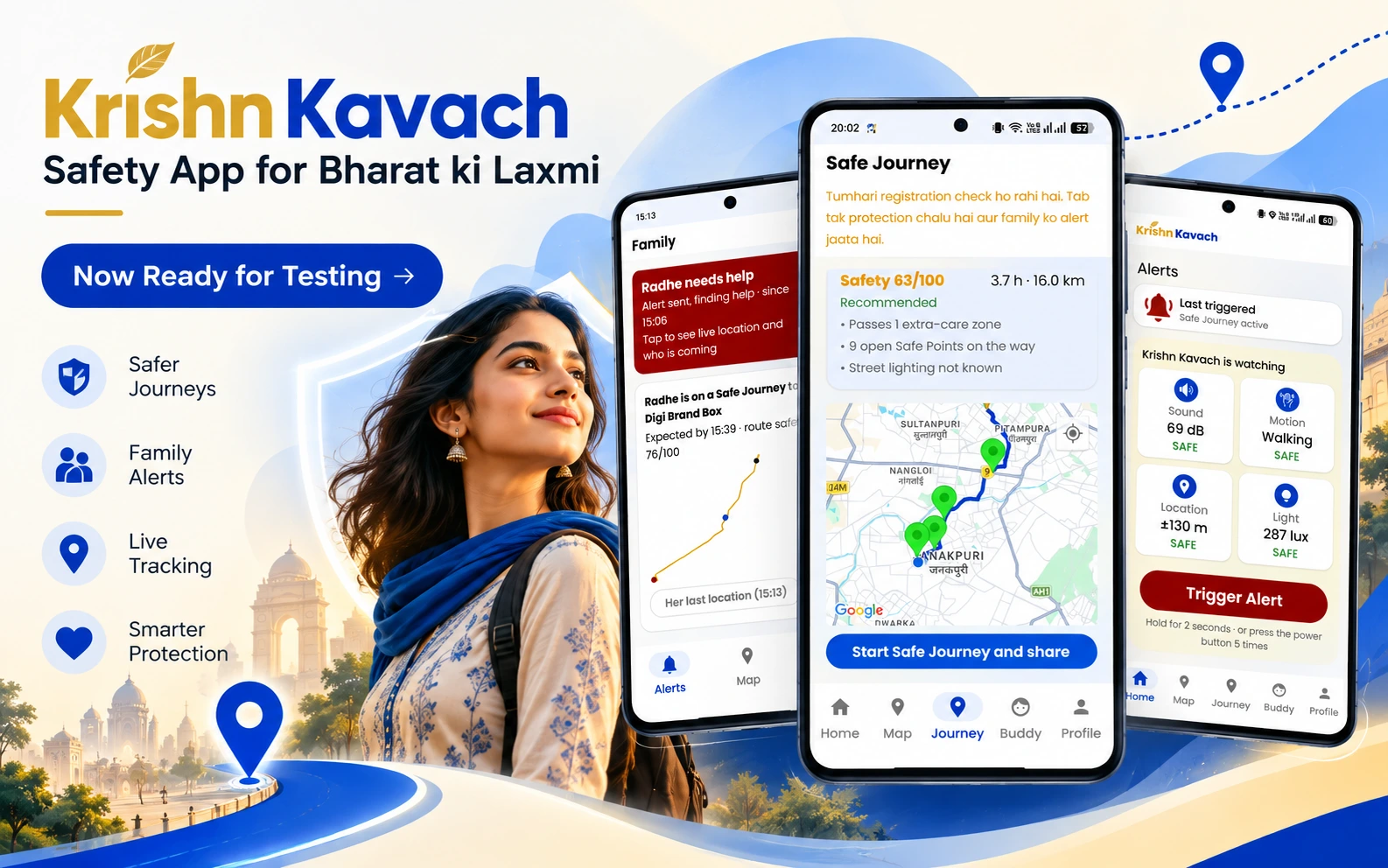
We just finished building the thing we set out to build. Krishn Kavach is now live for testing, and this post explains exactly what it does and how it does it.
Krishn Kavach is a personal safety app for women. It runs on the phone in the background, reads sensor signals that actually indicate danger, and when something is genuinely wrong, it dispatches a real verified person, called a Rakshak, to physically reach her, while her family watches the whole thing live. This post walks through the aim, the sensor technology, the exact algorithm that decides when to raise an alert, and the people behind it.
What Krishn Kavach Actually Does
Most safety apps give you a panic button and call it a day. We built Krishn Kavach around one rule instead: help must go out even when something fails. Every path that sends an alert carries a backup. Push notifications fall back to SMS. If her phone goes silent while protection is on, because it was switched off, smashed or lost its signal, the server notices within 90 seconds and opens the alert by itself. A Rakshak who does not respond gets replaced by the next one automatically. If nobody responds at all, the control room steps in directly.
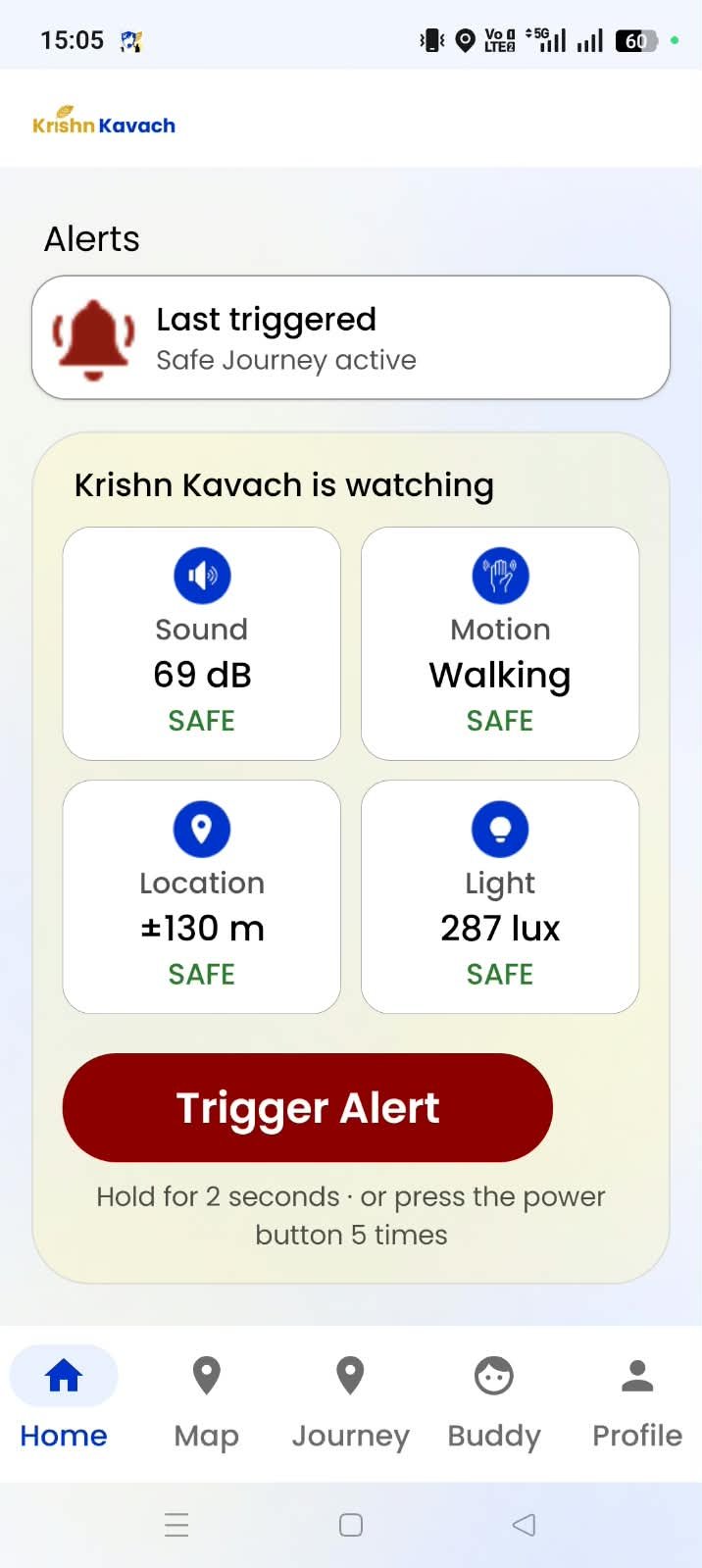
The app watches real sensor data the whole time it runs: sound, motion, light, location. It scores what it sees using a points based risk engine, and it only raises an automatic emergency when two or more danger signals line up together, never off a single noisy reading. When an alert does fire, the system dispatches two verified Rakshaks, notifies her family instantly, lets her family see and hear what is happening around her, and keeps a live timeline running until she is confirmed safe, not by herself alone, but with her family's independent confirmation too.
The Three People Who Make It Work
Krishn Kavach is not a single user app. Three roles work together on every incident.
- The woman (Safety User). The person the app protects. She sets her profile, her saved places and her trusted contacts, and the app watches over her from there. There are no PINs to remember.
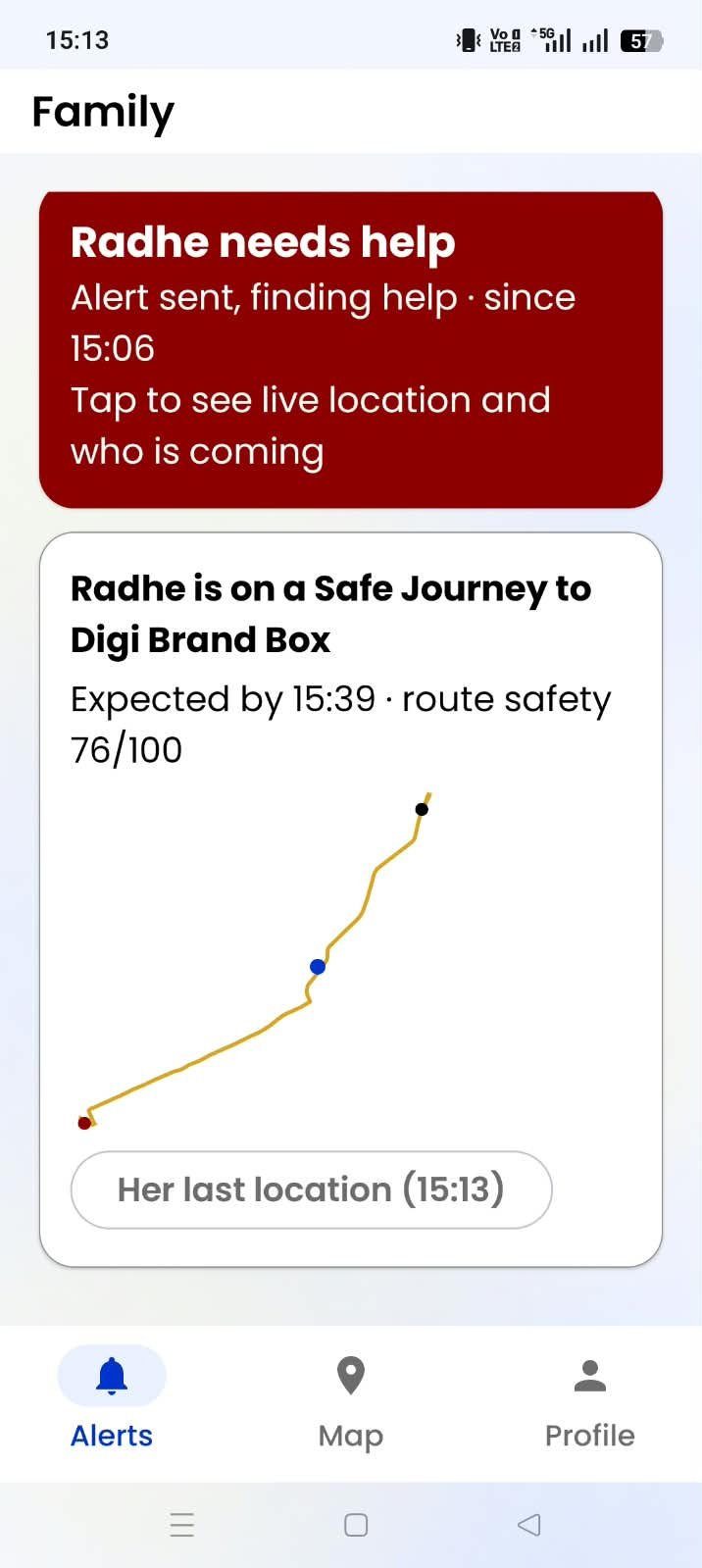
- Family (Trusted Contact). Up to three people she chooses. They get alerted the moment something happens and watch a live incident room with her location, her status, live sound and photos from her phone, and the Rakshaks' progress.
- Rakshak (Verified Responder). An identity verified volunteer who gets dispatched nearby. The Rakshak reaches her, proves the app sent them with a code that only her phone shows, and stays with her until family physically arrives.
How It Works, Step by Step
For the Woman Krishn Kavach Protects
- She signs in with her phone number. Firebase verifies the OTP, Krishn Kavach issues a session, and there is no password to remember or lose.
- She builds her safety profile. Name, age group, height, and vehicle details if she owns one. These are the physical details a Rakshak or her family would actually need to identify her quickly in an emergency.
- She adds up to three trusted contacts. Parents, a sibling, a friend. Each one gets an SMS invitation and can accept inside the app. Her own account also has a family view, so she can watch over a sister or a friend without switching to another account.
- She saves the places she visits often. Home, college, tuition, a relative's house, up to eight locations through Google Places search. The app uses these to learn what "normal" looks like for her, not to track her constantly.
- She verifies her identity. A live selfie and a government ID photo, reviewed by a real person at the control room, not an automated check. Protection is for women and girls; a minor's registration records a guardian's consent.
- She goes about her day, and the app watches quietly in the background. No constant tracking screen, no battery drain she notices, just a foreground service reading sensor data the way any fitness app would.
- She can call for help herself at any moment. Hold the SOS button for 2 seconds, press the power button 5 times, or use the hidden shake pattern without even taking the phone out.
- She can look back at every alert. A history screen lists her past alerts with their full timeline, and she can rate the Rakshaks who came to help her.
For Her Family
- They get linked automatically. Trusted contacts are matched by phone number, so even a parent who installs Krishn Kavach after her still gets connected correctly.
- They see nothing unusual on a normal day. No notifications, no live tracking screen, nothing to check obsessively.
- The moment an incident opens, they get an instant alert. Push notification first, SMS as a guaranteed backup.
- They watch a live incident room. Her location trail, a running timeline of what is happening, and the Rakshak team dispatched to her, with each Rakshak's rating and number of past rescues.
- They can see and hear what is happening around her. Her phone records sound in 10 second parts and takes photos silently, and family can tap "Listen live" to hear it about 10 to 20 seconds behind real time. Every file is encrypted, and every time someone opens one, it is logged.
- They hand over from the Rakshak. When family reaches her, their app shows a handover code. The Rakshak enters it, which proves the people taking over are really her family.
- They confirm she is safe independently. When she taps "I'm safe" or "False alarm", the alert disappears from her screen at once, but her family gets 2 minutes to confirm she is really okay. If nobody confirms in time, the alert goes back to high risk, every contact gets an SMS, and her location keeps sharing. One person alone, even her, cannot end an incident on their own.
For the Rakshak (She/he both)
- The Rakshak registers with their real identity. A live selfie, a government ID, their service background or professional designation, and a vehicle number if they have one.
- The control room reviews every Rakshak by hand. Only a verified Rakshak can ever go online or receive an offer. Nobody is dispatched on trust alone.
- The Rakshak goes on duty and shares their live location. Only while on duty, and this location lives in a fast lookup index built purely to find the nearest available Rakshaks.
- The Rakshak receives an offer and accepts within 30 seconds. They see the risk level and an approximate distance, not her exact address, until they accept. The control room can also send a particular Rakshak by hand.
- Each Rakshak confirms their identity with their own arrival code. Her phone shows a separate 4 digit code for each Rakshak, and she reads it out only once that Rakshak is standing in front of her. The second Rakshak gets a different code, so one Rakshak can never pass for the other, and five wrong tries lock the code.
- The Rakshak stays with her until her family arrives, and nowhere else. They do not escort her anywhere and do not get into a vehicle with her. They hand over only after entering the family's handover code.
- Their conduct is watched the entire time. Going silent, drifting from the meeting point, or leaving early all raise a flag, visible to her family and the control room, invisible to the Rakshak.
- Good work counts. Each completed rescue adds to the Rakshak's rescue count, and the women they helped can rate them afterwards.
Download Android App Here
The Sensor Technology Running Underneath
This is the part most safety apps skip explaining, so here is exactly what Krishn Kavach reads and the thresholds it uses. Every number below comes straight from the app's detection code.
- Sound (microphone). A scream detector watches for sound above 85 decibels held for at least 1.5 seconds. On top of that, an on-device sound classifier (YAMNet) listens for the acoustic pattern of screaming, shouting or sustained crying, but only for 10 seconds after the ambient sound crosses 65 decibels. It stays off the rest of the time to save battery, and the audio itself never leaves the phone.
- Motion (accelerometer). A struggle shows up as three or more sharp jerks above 2.5G within a 3 second window. A snatched phone shows up differently: a short free fall below 0.3G for at least 150 milliseconds, immediately followed by an impact above 3.0G. A phone simply dropped produces one impact with no free fall before it, so the detector tells the two apart.
- Speed (GPS). If she says she is walking but her actual speed holds above 25 km/h for 10 seconds, the app treats that as being taken somewhere in a vehicle against her stated plan. A sustained 12 to 25 km/h for 5 seconds reads as sudden running.
- Light and proximity. Below 10 lux for 10 seconds, while the phone is out of her pocket rather than held close to her body, reads as complete darkness in an unexpected place.
- Barometer (where the phone has one). A height change of roughly 3 meters within 3 minutes, while GPS signal is weak or lost, suggests she was taken indoors or underground. This one switches off automatically near her saved places, since stairs and lifts at home are completely normal there.
- A hidden shake pattern. Three deliberate bursts of shaking with a calm, quiet pause between each burst. Running, a struggle or a bumpy vehicle ride are continuous with no clean pauses, so this pattern stays distinct from all of them and works as a silent, deliberate SOS she can trigger without opening the app.
- Power button. Five quick presses of the power button send a silent SOS, even with the screen locked.
- Spoken distress words. An offline keyword model listens for a closed set of Hindi and English distress phrases such as "bachao," "chhodo," "koi hai," "mat karo" and "help." It runs entirely on the phone and needs no internet connection. The Hindi voice pack is a one-time download from the app's detection settings.
- Activity recognition. Google's on-device activity detection tells the app whether she is walking, running or in a vehicle, which feeds directly into the speed detector above instead of asking her to select a travel mode by hand.
- Heart rate (coming soon). The detection rule is already written and tested: outside 50 to 120 BPM for 30 seconds, while she is not exercising. It needs a smartwatch, so it is not switched on in this test version.
The Algorithm Behind the Alert
Every signal above carries a point value, and the app adds them up over a rolling 60 second window.
| Signal | Points |
|---|---|
| Phone snatched | 40 |
| Taken in a vehicle | 40 |
| Scream detected | 30 |
| Distress word spoken | 30 |
| Struggle (sharp jerks) | 30 |
| Off her planned route | 30 |
| Abnormal heart rate (smartwatch, coming soon) | 20 |
| Sudden running | 15 |
| Unusual stop at night | 15 |
| Sustained crying | 15 |
| Taken indoors unexpectedly | 15 |
| Complete darkness | 10 |
No single signal type can score above 70 points on its own, capped deliberately, so one noisy reading can only trigger a quiet check in, never an automatic emergency. A real automatic SOS needs two or more different signals adding up to 71 points or more together, or one unanswered check in.
Context adjusts the score too. At night, every point gets multiplied by 1.3. More than 2 kilometers from any of her saved places adds another 1.2 times. Being inside a known higher risk area adds 1.2 to 1.5 times. These multiply together, capped at 2.0 times total, so the same signal reads as more serious at 1 a.m. in an unfamiliar part of town than it does outside her own front door at 6 p.m.
The score then lands in one of four bands. Under 21 stays Low, business as usual. 21 to 40 is Elevated, the app starts watching more closely and shares location a little more often. 41 to 70 is Moderate, and the app asks her directly: "Kya aap theek ho?" She has 15 seconds to tap "Main theek hoon" or "Abhi madad bhejo." If she does not answer at all, help goes out. 71 and above is High, and the app raises an incident immediately, no check in, no waiting.
We deliberately removed PINs from the app. Someone standing over her can force a PIN out of her, or snatch the phone. So instead of trusting what is typed on her phone, Krishn Kavach trusts more than one person: closing an alert always needs her family's confirmation as well.
What Happens the Moment an Alert Fires
- The incident goes active immediately. For a high risk alert, all her family and the control room get notified in the same instant, through push with SMS as a guaranteed backup. For a moderate alert, her contacts are tried one by one, a minute apart, and Rakshaks are sent if none of them responds.
- Dispatch starts without waiting for anyone's approval. The server searches a live location index for verified, on duty Rakshaks within 5 kilometers and offers the incident to the two nearest at once.
- Each offer has a 30 second window. If nobody accepts, the next round goes out automatically. After three rounds the search radius widens to 10 kilometers and the control room gets alerted directly. The control room can also pick a Rakshak and send them by hand.
- Every acceptance is locked in atomically. Two Rakshaks can never end up in the same slot through a timing mistake, and dispatch keeps going until two Rakshaks have accepted.
- Evidence starts recording on her phone. Sound in 10 second parts and silent photos, encrypted and uploaded as they are made, so her family can listen live and nothing is lost even if the phone is taken.
- Each Rakshak must give her their own arrival code before anything else happens. This is the one proof she has that the person walking toward her is actually who the app sent.
- The Rakshaks stay at that exact meeting point until family physically arrives. Family's app shows a handover code, the Rakshak enters it, and only then does the Rakshak hand over.
- She closes the alert with one tap. "I'm safe" or "False alarm." The alert leaves her screen at once, and her family has 2 minutes to confirm she is really safe. If no one confirms, the alert goes back to high risk and her location keeps sharing. Recordings from a false alarm are deleted after 7 days.
Built So Nobody Is Ever Trusted Alone
There is no police integration in this system. Trust comes entirely from how Krishn Kavach is designed.
- Always a pair. Dispatch keeps going until two Rakshaks accept, a lead and a second, never just one person alone.
- A different code for every Rakshak. Each Rakshak has to give her their own code, so two Rakshaks cannot cover for each other.
- Women first, after dark. For a minor, or for any incident between 10 p.m. and 5 a.m., the first two dispatch rounds go only to women Rakshaks. Men get offered the incident only if no woman responder is available.
- Her silent veto. One tap removes a Rakshak from her incident completely. The Rakshak's own screen shows nothing different, no notice, no explanation, while a new Rakshak gets dispatched in their place and her family and the control room both get told.
- Conduct monitoring runs every 5 seconds. Going silent for 90 seconds or more, moving along with her faster than 20 km/h as if taking her somewhere, straying more than 400 meters from the agreed meeting point, or leaving before family arrives all raise a flag. Every flag reaches her family and the control room without ever reaching the Rakshak's own screen.
- Closing needs two people. She can end an alert on her screen, but only her family's confirmation ends it on the server.
Preventing Trouble Before It Starts
A real part of what we built is about never needing an incident at all.
- Extra care zones. Delhi is divided into roughly 500 meter cells, each carrying a risk level by time of day, built from crowd reported issues like poor lighting, harassment and stalking, plus real past incidents. No single person can inflate a zone's rating; the system needs reports from at least two different people before a cell counts at all.
- Safe Points. Verified public places she can wait at, checked by the control room before they go live: 24 hour chemists, hospitals, metro stations, and shops whose owners have agreed to help.
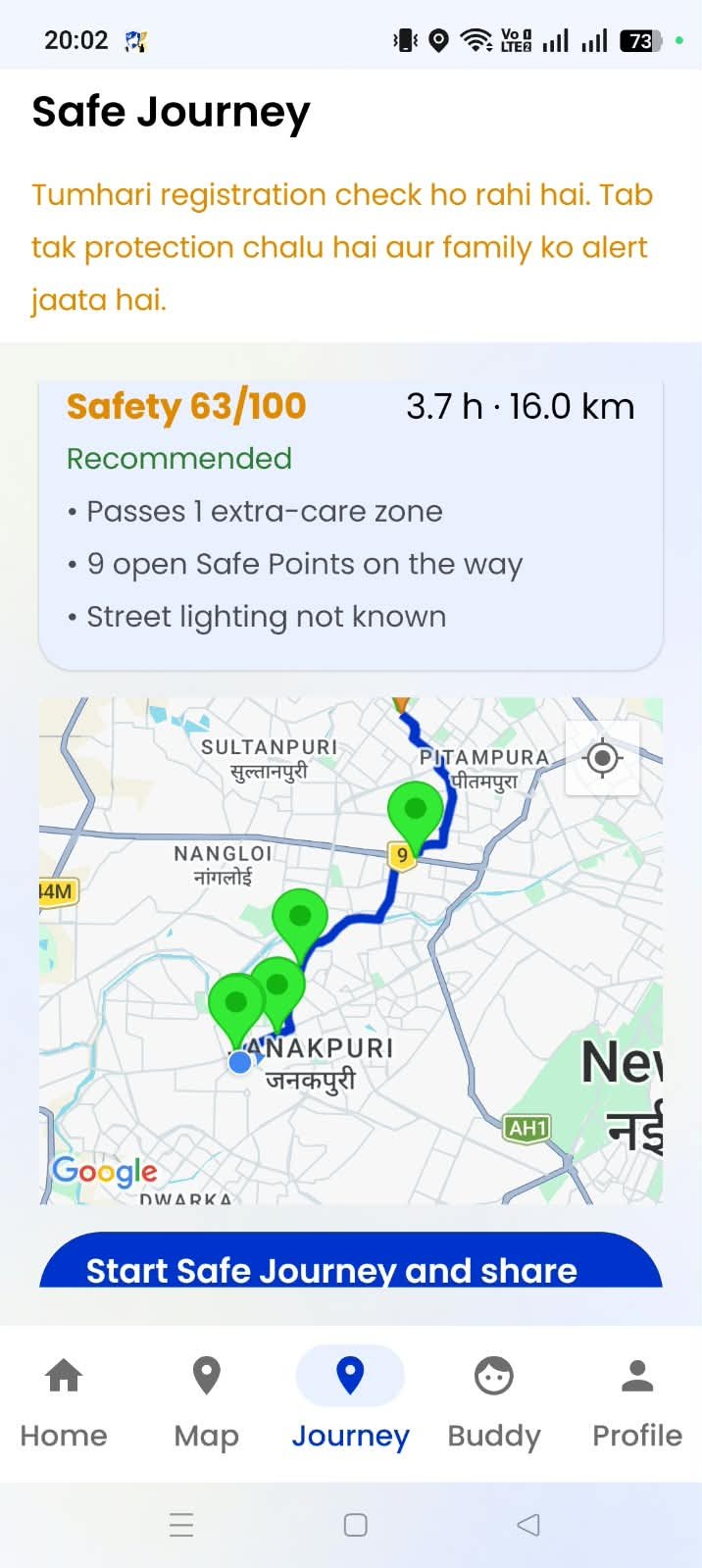
- Safe Route. When she asks for directions, the app scores alternative routes by how many extra care zones they avoid, how many open Safe Points sit along the way, and how well lit the path actually is, then recommends the safest option that is not dramatically slower.
- Safe Journey. She shares her route and expected arrival time with family, never with Rakshaks, since her destination is usually just home. Fifteen minutes late, and her family gets told while the app quietly asks her if she is okay.
- Buddy Walk. Two women heading the same direction, both verified by the control room, get matched to walk together from a shared Safe Point. Each sees only the other's first name and the meeting spot, never a phone number or home address.
- Fake call and siren. A fake incoming call lets her step out of an uncomfortable situation in front of someone without raising suspicion. A loud siren is entirely her own choice to trigger, and it never fires automatically during a silent alert.
- Ghar mode. If distress sounds get logged at home repeatedly, on the phone only, on three or more days across two weeks, the app quietly offers the women's helpline, 181. Nobody else gets told unless she chooses to share it.
The Best Thing About Krishn Kavach
The single best thing about Krishn Kavach is that it never asks her to trust one single point of failure. The sensors run on the phone itself, not in some far away server, so detection keeps working even with a weak connection. Audio analysis never leaves the device, so nothing she says gets uploaded just to watch for danger. Every automatic alert needs two separate signals agreeing with each other, so a loud street or a dropped phone cannot cry wolf on its own. Help always arrives as two verified people, never one, each proving themselves with their own code, and her family gets the final word on whether an incident is actually over, not her alone under possible pressure, and not the app guessing. That combination, on device privacy, multi signal confidence, paired human response, and independent family confirmation, is what the "best feature" question really comes down to. It is not any single sensor. It is that no single part of the system is ever trusted by itself.
We Are Testing It With 7 Volunteers From Delhi
Before Krishn Kavach goes fully live, we are running it through simulator based testing with real people playing each role, all based in Delhi. We are looking for:
- 3 women to test the Safety User experience: registration, saved places, the live dashboard, and triggering a simulated alert.
- 2 people to test the Family role: receiving alerts, watching and listening in the live incident room, and confirming she is safe during a simulated run.
- 2 people to test the Rakshak role: verification, going on duty, accepting a simulated dispatch, the arrival code and the family handover.
This round of testing runs on a simulator, so no real dispatch gets triggered. It is built to test the logic, the timing, and the experience for each role before anything goes live in the field.
If you are based in Delhi and want to be one of the seven, message us on WhatsApp and we will set you up for a test run:
Message us on WhatsApp to volunteer
Frequently Asked Questions
What exactly is Krishn Kavach?
Krishn Kavach is a personal safety app for women. It reads sensor data on the phone, scores how risky the current moment looks, and when enough signals agree, it alerts family and dispatches two verified Rakshaks to reach her in person.
Does it drain the phone's battery?
No more than a typical fitness app. GPS checks every 30 seconds in normal Safe mode, tightening to every 5 seconds once Alert mode turns on and every 3 seconds during an actual emergency, so the heaviest tracking only runs when it is actually needed.
What makes an alert fire automatically?
Two or more different danger signals need to agree within a 60 second window, or one check in question goes unanswered. No single sensor reading can trigger an automatic emergency by itself.
Does she need to remember a PIN?
No. There are no PINs in Krishn Kavach. Answering a check in is one tap, and closing an alert is one tap. Because anyone can force a PIN out of someone, the app relies on her family instead: an alert only fully ends when her family confirms she is safe within 2 minutes.
What if someone forces her to close the alert?
Her screen shows the alert as closed, so nothing looks unusual to the person next to her. But her family still has to confirm she is safe. If they do not confirm within 2 minutes, the alert goes back to high risk, every contact gets an SMS, and her location keeps sharing.
Who are the Rakshaks?
Identity verified volunteers who register with a live selfie, a government ID, and their service or professional background. A real person at the control room reviews every application by hand before that account can ever go online.
Can one Rakshak act alone?
No. Dispatch always continues until two Rakshaks accept an incident, each one has a separate arrival code, and their conduct gets checked automatically every 5 seconds for the whole time they are assigned.
Is audio ever uploaded to a server?
Not to watch for danger. Scream and distress word detection both run on the phone itself. Audio and photos only leave the device as encrypted evidence once an actual alert is open, so her family can listen live. Every file opened is logged, and recordings from a false alarm are deleted after 7 days.
How can I volunteer to test it?
Message the WhatsApp number above if you are based in Delhi. We need 3 women to test the Safety User role, 2 people for the Family role, and 2 for the Rakshak role, all through simulator based testing.